![LOGO_WV-1.png]](https://help.martianlogic.com/hs-fs/hubfs/LOGO_WV-1.png?height=40&name=LOGO_WV-1.png)
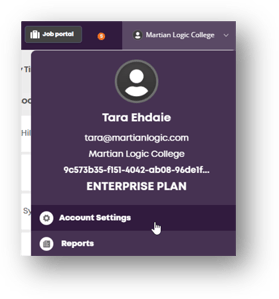
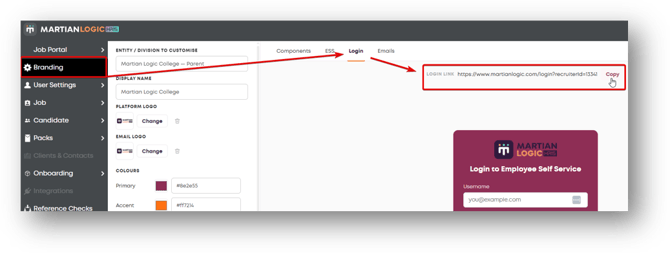
First, you will need to retrieve your unique Martian Logic portal link.
To retrieve the link:
Account Settings > Branding > Log In > Copy > Paste into Step 1 in the email template below
HR Announcement Email Template
Customise, copy and paste the template below to notify employees about the launch of the new portal.
Subject: Action Required: Welcome to the New Employee Self Service Portal!
Hi Team,
We are excited to announce the launch of our new Martian Logic Employee Self Service (ESS) Portal!
This system will serve as a central hub for managing your workplace information. Going forward, you will use this portal to:
- Complete key compliance items
- Submit leave requests
- Complete performance review templates
- Fill out and submit required HR forms
How to Activate Your Account
Please follow these steps to set up your account:
- Go to the login page: (Insert Link)
- Click Forgot your password above the login box.
- Enter your work email address to receive a password creation link.
- Follow the instructions in the email to set your password.
- Log in to access your account dashboard.
For help navigating the portal, visit: https://help.martianlogic.com/knowledge-base/how-to-navigate-employee-self-service-for-employees
Please complete your initial log in by [Insert Date].
If you run into any issues or have questions, reach out to the HR team at [Insert Contact Email/Phone].